


Exam Objectives
This is a certification for entry-level help desk technicians, end user desktop support
technicians, IT students, interns, etc. The exam targets entry-level IT professionals, and
secondary and immediate post-secondary students. The successful candidates are
qualified entry-level help desk technicians and customer support technicians, students,
and interns with at least 150 hours of instruction and hands-on experience.
00-140 CCST IT Support domains:
- IT Support Job Tasks and Responsibilities
- Hardware Issues
- Connectivity and Resource Access Issues
- Operating System and Application Issues
- Common Threats and Preventions
- Job Tools
1. IT Support Job Tasks and Responsibilities
1.1 Define key help desk concepts.
1.2 Prepare documentation to summarize a customer interaction.
1.3 Describe the problem solving process.
2. Hardware Issues
2.1 Demonstrate how to follow basic safety procedures.
2.3 Assist end users in locating, identifying, and understanding the
characteristics of various ports and cables.
2.4 Identify, install, and upgrade various components in a desktop computer.
2.5 Investigate commonly encountered hardware issues.
3. Connectivity and Resource Access Issues
3.1 Assist users with establishing access to network-based resources.
3.2 Troubleshoot commonly encountered connectivity issues with
4. Operating System and Application Issues
4.1 Assist users in resolving Windows operating system issues.
4.2 Assist users in resolving MacOS operating system issues.
4.3 Assist users in resolving mobile device issues.
4.4 Describe virtualization and cloud terminology.
4.5 Assist users in resolving common application issues.
5. Common Threats and Preventions
5.1 Describe security threats to the end user, perform basic investigation,
and escalate to the appropriate team.
5.2 Recognize how to avoid becoming a victim of social engineering attacks.
5.3 Recognize how company policies and confidentiality guidelines protect
user data.
6. Job Tools
6.1 Use remote access software to connect to end-user devices and perform
6.2 Use appropriate troubleshooting tools to research an issue and update
internal documentation with findings.
Cisco Overview
Kick-start your career with a Cisco certification!
Cisco, the worldwide leader in technology that powers the Internet, has partnered with Certiport to create the Cisco Certified Support Technician (CCST) certification program.
This program includes three certification exams designed to validate work-ready skills and knowledge to help learners find a job in the field of end user support, networking, and cybersecurity. Earning a Cisco Certified Support Technician certification showcases the learner’s skillset to employers, telling them they are ready to roll up their sleeves on day one.
The 100-140 CCST IT Support, 100-150 CCST Networking, and 100-160 CCST Cybersecurity exams were created by a team of subject-matter experts from diverse careers and industries (including Cisco employees, networking and cybersecurity professionals, hiring managers, professors, teachers, and the experts at Certiport) to ensure these certifications effectively bridge the gap between education and the skills and knowledge needed to succeed in the workplace. It helps prepare learners for high-demand roles in tech support, networking, and cybersecurity, including analysts, auditors, support specialists, and technicians.
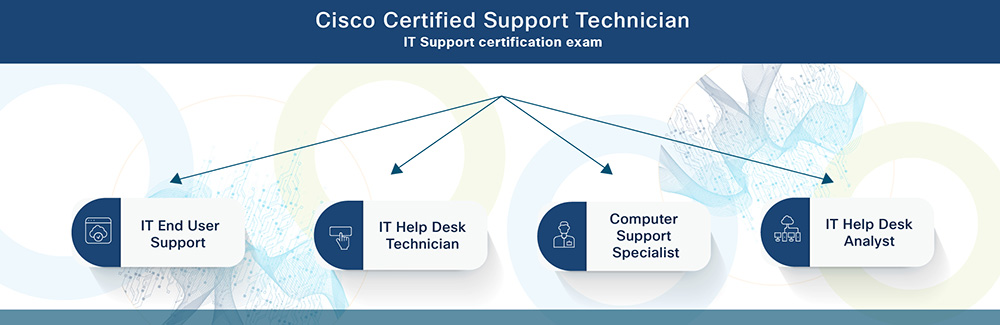
Cisco Certified Support Technician
IT Support certification exam
- IT End User Support
- IT Help Desk Technician
- Computer Support Specialist
- IT Help Desk Analyst
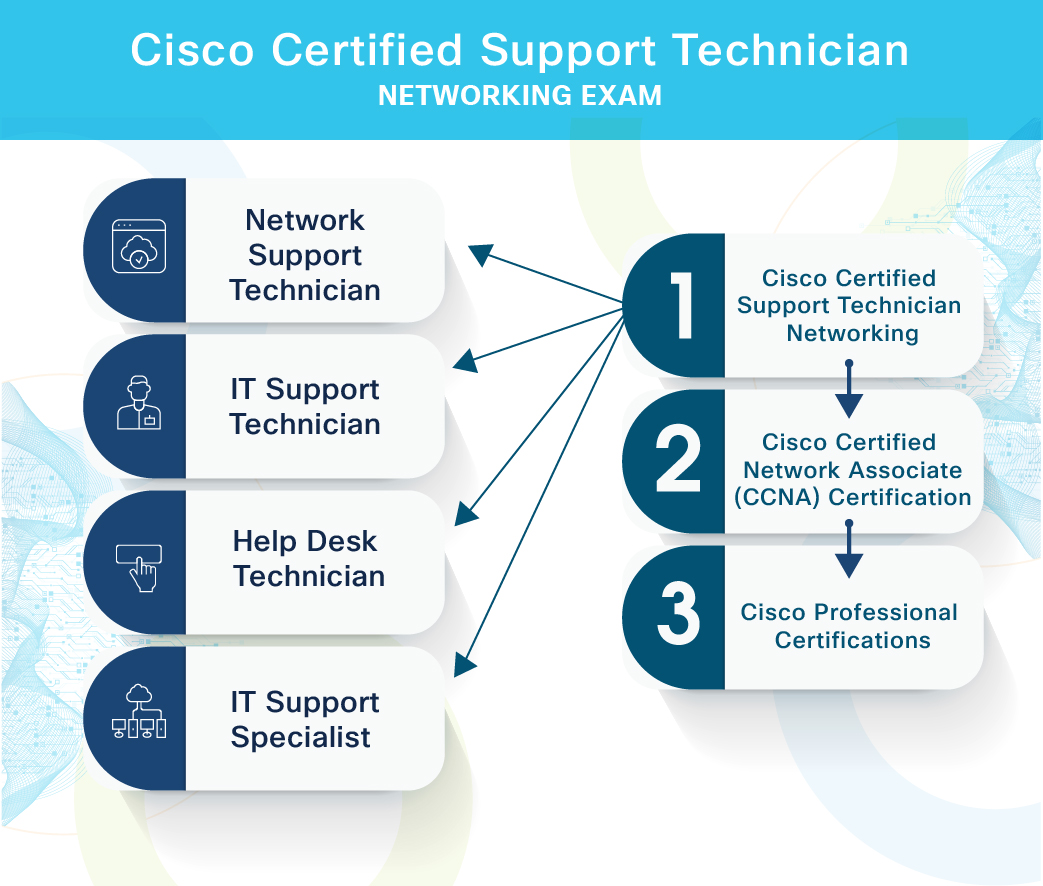
Cisco Certified Support Technician Networking Exam
- Cisco Certified Support Technician Networking
- Network Support Technician
- IT Support Technician
- Help Desk Technician
- IT Support Specialist
- Cisco Certified Network Associate (CCNA) Certification
- Cisco Professional Certifications
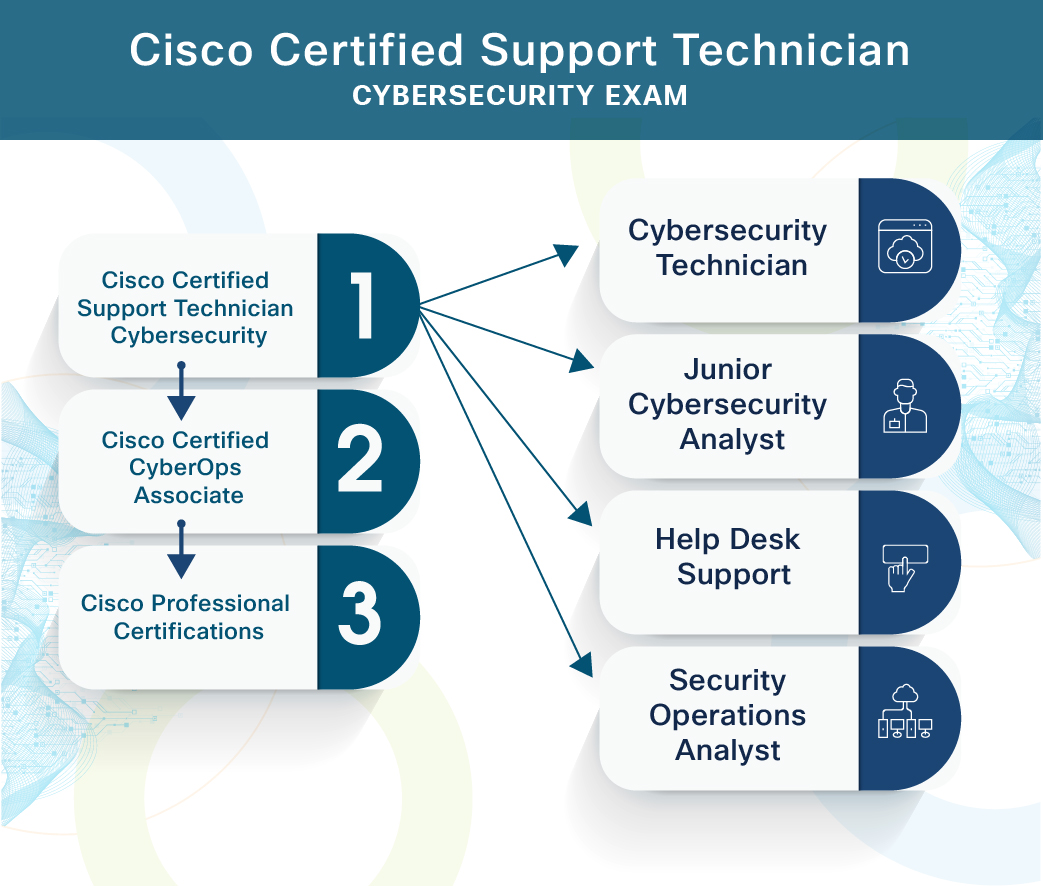
Cisco Certified Support Technician Cybersecurity Exam
- Cisco Certified Support Technician Cybersecurity
- Cybersecurity Technician
- Junior Cybersecurity Analyst
- Help Desk Support
- Security Operations Analyst
- Cisco Certified CyberOps Associate
- Cisco Professional Certifications
Learners that earn the Cisco Certified Support Technician certifications are expected to have the required knowledge and work-ready skills necessary to launch a career in IT support, networking, and cybersecurity, through at least 150 hours of instruction. The Cisco Certified Support Technician program comprises these certifications: Cisco Certified Support Technician IT Support, Cisco Certified Support Technician Networking and Cisco Certified Support Technician Cybersecurity.
Cisco Certifications
igital badges are web-enabled versions of a credential, certification or learning outcome. Representing your credential as a badge gives you the ability to share your skills online in a way that is simple, trusted and can be easily verified in real time.
Flash your badge
Credly is the digital badging platform used by Certiport. It helps students move forward professionally by quickly establishing credibility for opportunities in higher education and the job market. Each badge contains verifiable data that tells employers and admission committees what you did, who says you did it, and why it matters. What does this mean for you?
More information
Visit Credly to find out more information...
Have you not received your badge?
Contact Cisco Support at: https://certsupport.cisco.com/s/opencase
- Log in with the email address that was used to take the CCST certification exam.
- In the Manually Selected Products drop-down list, select: Enterprise Badging Program.
- In the selection box just below, select: L&C Certification Badges.
- Enter the remaining required details.
- In the Description, include the following details:
- Badge Name
- Email Address (Enter the email address that was used to take the CCST certification exam)
- CCO ID (if known)
- CSCO ID (if known)
- Submit the ticket.
Please note:
- An email from Credly to claim your badge can take up to 48 hours to be delivered to your inbox.
FAQ
Enquiries